Validation and Cleaning
This page contains tips and best practices for handling the messy inconsistencies typical of real-world datasets during virtual ingestion.
Data inconsistencies
Assembling a single virtual store from many files requires exploiting some common structure across those files. Sometimes you know that structure a priori, and sometimes you infer it by looking at the contents of the files.
However sometimes you think you know the structure, only to find upon closer examination that the files aren't as orderly as you assumed. This can be frustrating, as it might prevent virtualization. But some best practices can help make it less painful, either by working around such inconsistencies, or at least exposing them earlier.
Declarative schema validation
One very helpful approach is to declare your expectations about the files up-front, then validate their actual contents against these expectations as you ingest.
Validation with Pandera
One good tool for defining and validating schemas is pandera, whose pandera.xarray module (docs) can be applied to virtual datasets.
As pandera separates schema validation from data validation, its default behaviour avoids trying to load virtual chunks, and so it works with virtual datasets out of the box.
In practice you would obtain your virtual dataset from open_virtual_dataset.
So that this page is runnable without any real data files, we instead fabricate an equivalent virtual dataset by wrapping ManifestArray objects (see Data Structures) - its data variables are backed by chunk references, exactly as they would be after a real virtual ingestion.
import numpy as np
import xarray as xr

from virtualizarr.manifests import ChunkManifest, ManifestArray
from virtualizarr.manifests.utils import create_v3_array_metadata


def virtual_variable(shape, dtype, dims, path="s3://bucket/file.nc"):
    """A single-chunk ManifestArray-backed variable, standing in for `open_virtual_dataset`."""
    metadata = create_v3_array_metadata(
        shape=shape, chunk_shape=shape, data_type=np.dtype(dtype)
    )
    chunk_key = ".".join("0" for _ in shape)
    manifest = ChunkManifest(
        entries={chunk_key: {"path": path, "offset": 0, "length": 1000}}
    )
    marr = ManifestArray(metadata=metadata, chunkmanifest=manifest)
    return xr.Variable(dims, marr)


vds = xr.Dataset(
    {
        "temperature": virtual_variable((3, 4), "float64", ("x", "y")),
        "pressure": virtual_variable((3, 4), "float64", ("x", "y")),
    },
    coords={"x": np.arange(3, dtype=np.float64)},
)
print(vds)
<xarray.Dataset> Size: 216B
Dimensions:      (x: 3, y: 4)
Coordinates:
  * x            (x) float64 24B 0.0 1.0 2.0
Dimensions without coordinates: y
Data variables:
    temperature  (x, y) float64 96B ManifestArray<shape=(3, 4), dtype=float64...
    pressure     (x, y) float64 96B ManifestArray<shape=(3, 4), dtype=float64...
Notice that the data variables are ManifestArray objects - no chunk data has been loaded.
We can now declare a schema and validate the virtual dataset against it.
If the dataset conforms to the schema, validate returns it unchanged; otherwise it raises an informative error.
import pandera.xarray as pa

schema = pa.DatasetSchema(
    data_vars={
        "temperature": pa.DataVar(dtype=np.float64, dims=("x", "y")),
        "pressure": pa.DataVar(dtype=np.float64, dims=("x", "y")),
    },
    coords={"x": pa.Coordinate(dtype=np.float64)},
)
schema.validate(vds)
This is a very powerful way to double-check your assumptions about your data files. The best time to check these assumptions is generally before you attempt to combine them.
Note
While VirtualiZarr should prevent you combining virtual datasets in ways that cannot form a single valid Zarr store (e.g. by erroring upon concatenation), the reason it's a good idea to perform these kinds of checks before combining is that you get more immediate and informative errors.
It also makes it easier to iteratively develop a processing pipeline - adjusting expectations of your schema is clearer and more robust than adding more if-else statements to your code.
Tip
If you pass lazy=True to schema.validate(ds), then instead of pandera raising on the first violation of your schema it detects, instead you will get a detailed list of every way in which the dataset fails to conform to your schema. This collection of structural errors is still gathered without loading any chunk data.
Asserting that variables are still virtual
Pandera's duck array support lets you constrain the type of array backing each variable.
Note that pandera's chunked=True option specifically checks for Dask-backed arrays, so it will not match a virtual variable, which is backed by a ManifestArray.
To assert that a variable is still virtual (i.e. that it has not been accidentally loaded into memory), pass array_type=ManifestArray:
virtual_schema = pa.DatasetSchema(
    data_vars={
        "temperature": pa.DataVar(
            dtype=np.float64, dims=("x", "y"), array_type=ManifestArray
        ),
    },
)
virtual_schema.validate(vds)
Checking data values
pandera also allows you to check assertions about data values, via pa.Check.
This is useful for loadable_variables especially - perhaps you want to check that all your files share the same latitude / longitude grid values, or have a datetime coordinate that falls within the expected year.
Value checks force pandera to read the actual array values, so they only apply to variables that are genuinely loadable (for example coordinates, which open_virtual_dataset loads by default).
Running a value check against a virtual variable would attempt to load its chunks and raise.
Because reading values is skipped by default for performance, you must opt in by setting the validation depth to SCHEMA_AND_DATA:
from pandera.config import ValidationDepth, config_context

coord_schema = pa.DatasetSchema(
    coords={
        # the `x` coordinate is loaded, so we can assert things about its values, e.g. that it is >= 0
        "x": pa.Coordinate(dtype=np.float64, checks=pa.Check.ge(0)),
    },
)

with config_context(validation_depth=ValidationDepth.SCHEMA_AND_DATA):
    coord_schema.validate(vds)
One simple but effective approach is to set strict expectations and then scan every single file in your dataset to check for inconsistencies.
Validation during preprocessing
If you're using open_virtual_mfdataset, a neat pattern is to use the preprocess function kwarg as your opportunity to do validation.
The preprocess function is applied to each file's virtual dataset individually, before they are combined, so any inconsistency is caught early and the error points at the offending file.
import pandera.xarray as pa

from virtualizarr import open_virtual_mfdataset
from virtualizarr.parsers import HDFParser

schema = pa.DatasetSchema(
    data_vars={
        "temperature": pa.DataVar(dtype=np.float64, dims=("time", "x", "y")),
    },
    coords={"x": pa.Coordinate(dtype=np.float64)},
)


def validate(vds):
    # raises if this file doesn't match our expectations, otherwise passes the
    # virtual dataset through unchanged so it can be combined
    return schema.validate(vds)


vds = open_virtual_mfdataset(
    urls,
    parser=HDFParser(),
    registry=registry,
    preprocess=validate,
)
Wrangling to consistency
Virtual ingestion cannot alter the contents of virtual chunks (at least not without duplicating the data), but it can alter almost anything else, such as array metadata or chunk layouts. Therefore some types of inconsistencies can be corrected during the virtual ingestion process. Correcting data so that it is more suitable for use is known as data munging or data wrangling.
Another useful pattern is to parse each file, validate its contents against a somewhat permissive schema, then wrangle it until it perfectly fits a more rigid schema, all before combining. Again this can be done as part of the pre-processing step.
# a permissive schema describing what the raw files actually look like
raw_schema = pa.DatasetSchema(
    data_vars={"t2m": pa.DataVar(dtype=np.float32, dims=("time", "x", "y"))},
)

# the strict schema we want every file to conform to before combining
clean_schema = pa.DatasetSchema(
    data_vars={"temperature": pa.DataVar(dtype=np.float32, dims=("time", "x", "y"))},
)


def wrangle(vds):
    raw_schema.validate(vds)

    # virtual ingestion can rewrite metadata (names, attrs, chunk layout) without
    # touching the underlying chunks - here we rename a variable to a canonical name
    vds = vds.rename({"t2m": "temperature"})

    return clean_schema.validate(vds)


vds = open_virtual_mfdataset(
    urls,
    parser=HDFParser(),
    registry=registry,
    preprocess=wrangle,
)
Example inconsistencies
Here are some example types of inconsistencies you might encounter, and what your options are for dealing with them.
Missing files/variables/chunks
Real-world datasets have missing data.
Zarr's convention for representing missing data elements is to set their value to a specified fill_value.
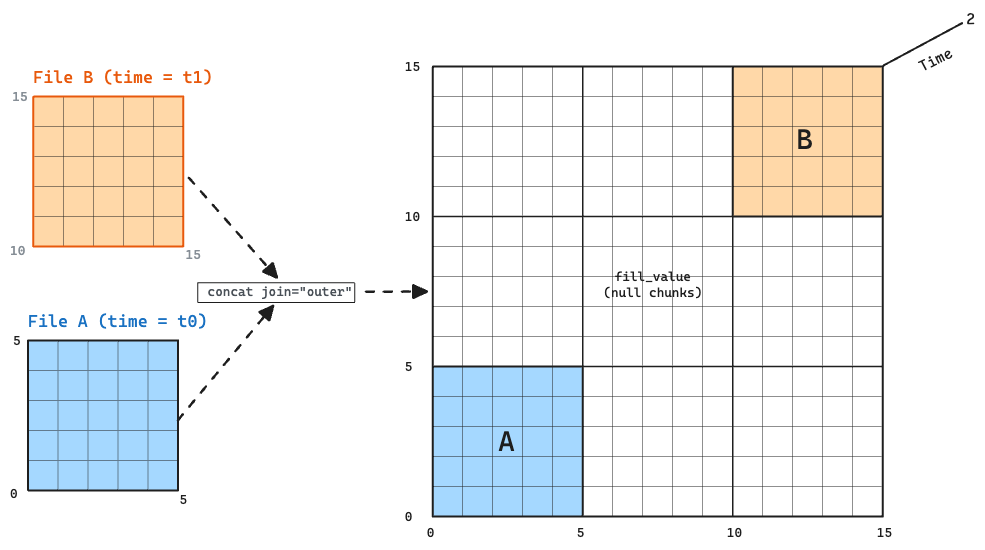
But sometimes there are not just one or two elements missing - entire chunks/variables/files are not present. In other words the chunks of an array across various files do form a logical grid, but only a sparse grid, not a dense grid.
Note
Missing chunks are handled very efficiently by Icechunk - arguably much more efficiently than with the Native Zarr format.
In Native Zarr, while a chunk key is allowed to be uninitialized, a reader only discovers the absence at read-time, when the store attempts to fetch the chunk key from storage and finds nothing at that path.
In contrast, since Icechunk records in the manifest whether or not each chunk was initialized, it doesn't need to attempt to fetch a chunk to know whether it exists.
These sparse chunk grids can arise in real datasets for a few reasons:
- Perhaps the data model of the archival files gives fewer guarantees about the chunk grid, and allows chunks to be effectively missing, such as is the case with GRIB.
- Perhaps some variables were not sampled at certain timesteps and ended up being omitted from certain files entirely.
- Perhaps the data is inherently sparse at a global level, whilst still being dense at a regional level (e.g. tree canopy height data would not exist over the oceans). In that case it might make sense for the data files to all be individually complete, and all be tilable onto a global domain, but some files still not be present.
If the chunks do truly align onto a single grid, it is possible to represent the absence of entire virtual chunks, since the chunk manifest is allowed to be sparse.
VirtualiZarr provides some utilities for creating virtual datasets with such sparse chunk grids.
The ManifestArray.with_fill_value_only method returns a new ManifestArray with the same schema (shape, chunks, codecs, dimension names, attributes) as a given ManifestArray, but with an empty chunk manifest and the given fill_value.
This is useful for filling in missing files/variables, by creating virtual datasets containing manifestarrays which have no chunk references.
# a virtual variable from a file where the data is present
present = virtual_variable((1, 3, 4), "float32", ("time", "x", "y"))

# stand in for a file where this variable is absent: same schema, but an empty
# manifest, so reads return the fill value rather than referencing any chunks
missing = xr.Variable(
    ("time", "x", "y"),
    present.data.with_fill_value_only(fill_value=np.float32("nan")),
)

ds_present = xr.Dataset({"temperature": present})
ds_missing = xr.Dataset({"temperature": missing})

# concatenate into a single logical grid spanning present and missing data
combined = xr.concat([ds_present, ds_missing], dim="time")
print(combined)
<xarray.Dataset> Size: 96B
Dimensions:      (time: 2, x: 3, y: 4)
Dimensions without coordinates: time, x, y
Data variables:
    temperature  (time, x, y) float32 96B ManifestArray<shape=(2, 3, 4), dtyp...
The combined variable is still a single ManifestArray of shape (2, 3, 4), but only the first timestep references real chunks.
Reading data from the second timestep would return the array's fill_value.
In the previously mentioned case when a dataset is "inherently sparse at a global level, whilst still being dense at a regional level", when users want to concatenate these sparse datasets they can use normal xarray concatenation patterns with outer join.
xr.concat([ds_1, ds_2], dim="time", join="outer")
Inhomogeneous Codecs
Zarr arrays are by definition made up of a grid of chunks with identical codecs (e.g. for compression). If the data archive does not use the same codecs for all the chunk in a single logical array, they cannot be virtualized as a single array.
Such inhomogeneous codecs can arise in the real world because: - Pipelines chose compression parameters to be optimal per-file, instead of prioritising consistency across files. - The data provider decided to deliberately change their compression codecs at some point during the operational lifetime of an archive, perhaps because they realized a better compression algorithm was available, - The change was unintentional, caused by changing defaults between file writer library versions.
Note
Ultimately we want virtualization to be able to handle inconsistent codecs. But it requires a significant change to the Zarr data model and so is likely to take some time to land.
Today your only real option is to split the offending array into multiple arrays. This is why in the GOES-16 archive example we split the timeseries into multiple similar groups. Each group has the same structure, but each represents a different "era", in which the codec was consistent, but the codec varies between groups. This creates some extra friction for the user of the virtual store, but that might be acceptable.
Inhomogeneous CF encoding
Many tools (including Xarray) apply an extra decoding step on read that interprets CF conventions encoding attributes such as scale_factor and add_offset.
If these differ between files, the combined store will be decoded incorrectly.
What makes this case especially dangerous is that, unlike inhomogeneous codecs, chunk shapes, or dtypes, a mismatch here does not raise an error when you concatenate. Xarray's default attribute-merging behaviour silently drops the conflicting values, so you end up with a virtual store that loads without complaint but returns wrongly-decoded data. See the FAQ and the warning under Combining virtual datasets for more details.
This silent failure mode is a strong argument for declaring a strict schema and validating the CF encoding of every file up front, before combining.
Because the encoding attributes live in each variable's attrs, a schema-level check catches the inconsistency without loading any chunk data:
# a virtual temperature variable carrying CF packing attributes
packed = virtual_variable((3, 4), "int16", ("x", "y"))
packed.attrs = {"scale_factor": 0.01, "add_offset": 0.0}
ds_packed = xr.Dataset({"temperature": packed})

# pin the expected CF encoding, so a file packed differently is rejected here
# rather than silently mis-decoded after combining
encoding_schema = pa.DatasetSchema(
    data_vars={
        "temperature": pa.DataVar(
            dtype=np.int16,
            dims=("x", "y"),
            attrs={"scale_factor": 0.01, "add_offset": 0.0},
        ),
    },
)
encoding_schema.validate(ds_packed)